





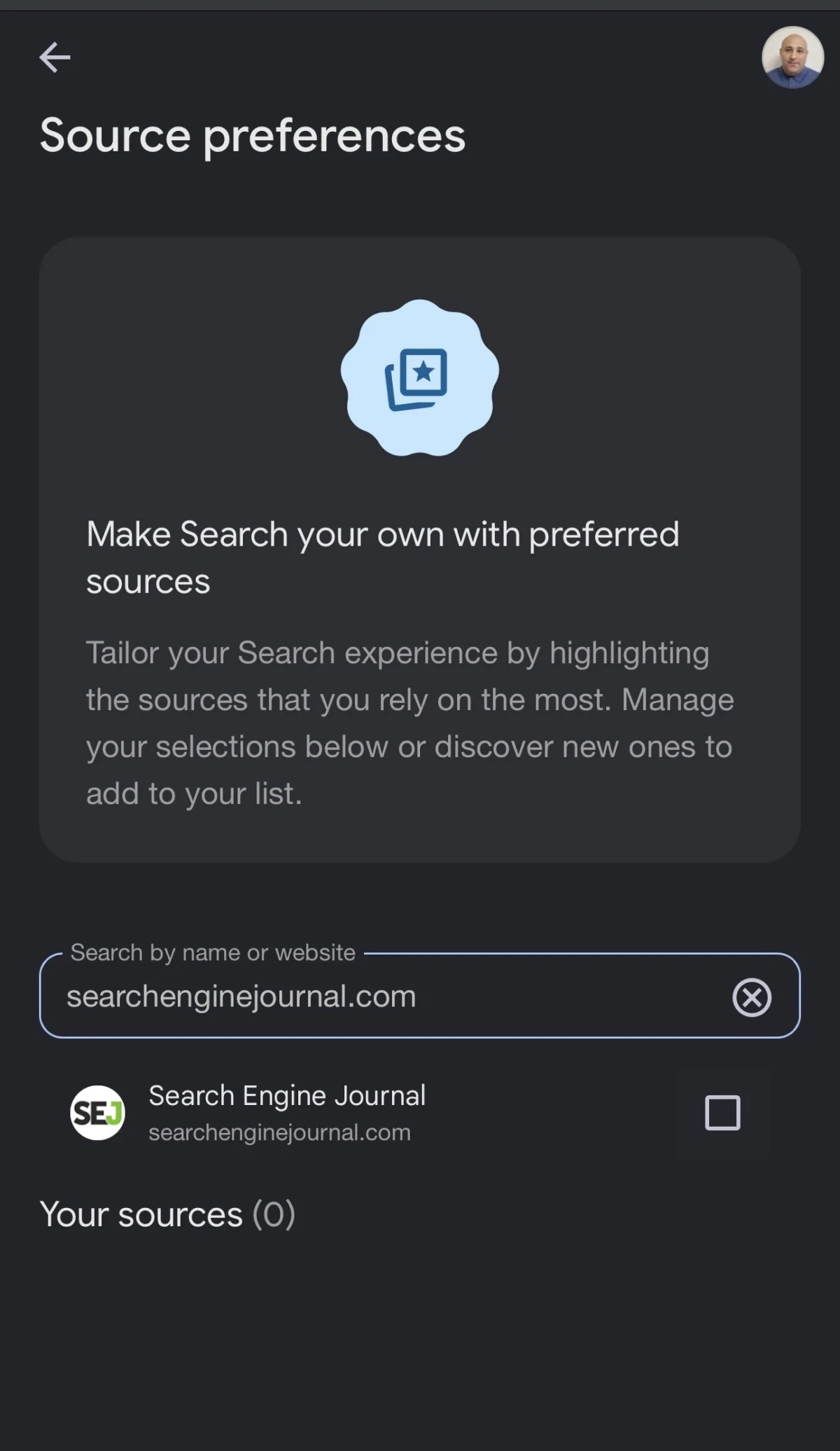
In an era where algorithmic discovery often feels beyond the control of content creators, Google’s "Preferred Sources" feature offers a rare mechanism for publishers to foster direct, intentional relationships with their audience. Recently, Google introduced an improved "Preferred Sources" embed—a streamlined button implementation designed to reduce friction for users looking to prioritize specific publications within their Google Search, Discover, and AI-powered interfaces.
By simplifying the subscription process, Google is providing publishers with a more effective tool to cultivate a loyal readership. This article explores the mechanics, implementation strategies, and strategic implications of this new feature, providing a roadmap for publishers looking to integrate it effectively.
The Core Functionality: What Are Preferred Sources?
At its heart, the Preferred Sources feature is a personalization tool. It allows a reader to explicitly signal to Google that they value a particular publication. When a user selects a site as a "Preferred Source," they are essentially telling the search engine to favor content from that domain within their personalized feeds, such as "Top Stories," Discover, and increasingly, AI-driven experiences like AI Overviews and AI Mode.
It is critical to distinguish this from traditional SEO. Preferred Sources is not a global ranking signal. Adding the button to your site will not magically improve your domain authority, nor does it guarantee that your articles will occupy the top slot in search results for the general public. Instead, its power lies in personalization: it ensures that your specific readers see more of your work, strengthening the connection between your brand and your audience.
According to official Google documentation, this feature is available globally wherever Google Search is localized. As Google shifts toward more generative search results, the ability to appear in AI-driven summaries via a reader’s "preferred" status is becoming a significant asset for publishers aiming to maintain traffic in an evolving search landscape.
Chronology and Evolution of the Feature
The evolution of Google’s discovery tools has moved from purely algorithmic sorting toward a hybrid model that incorporates user agency.

- Initial Launch: Google introduced the ability for users to manage their news sources, allowing them to manually curate which publishers appear in their "Top Stories" and news feeds.
- The Deeplink Era: Initially, publishers were encouraged to share deeplinks—standard URLs that directed users to the Google Source preferences tool. While effective, this created a multi-step journey: the user left the article, arrived at a general preferences page, had to search for or identify the publication, check a box, and then manually return to the site.
- The Embed Revolution (August 2026): Recognizing the friction in the manual flow, Google released the JavaScript-based embed. This allows the "Add to Preferred Sources" action to occur within an overlay, often keeping the user within the same browser context and reducing the "click-to-completion" path significantly.
This transition marks a shift in how Google views the publisher-audience relationship, moving from a passive discovery model to one that actively encourages user-led curation.
Implementation Strategies: Button vs. Deeplink
For webmasters and developers, choosing the right implementation method is a balance between technical ease and user experience.
The Standard Embed
The standard JavaScript implementation is the recommended path. By loading the publisher.js library in the <head> of your site, you enable a seamless, localized experience. When a user clicks the button, Google triggers a publication-specific confirmation modal. Because the browser handles the context, the user is automatically returned to the article after the action is confirmed.
This approach is superior for high-traffic sites where retention is the primary goal. It removes one full step from the user journey, which, in the context of mobile conversion, can lead to a measurable increase in "subscribing" users.
The Deeplink Alternative
The deeplink remains a valid, albeit slightly higher-friction, option. It is best suited for scenarios where technical restrictions prevent the use of custom JavaScript, such as:
- Email newsletters.
- Third-party social media posts.
- CMS environments with restricted header access.
While the deeplink takes the user to a generic preferences screen, it still serves the purpose of directing them to the destination. However, developers should always prioritize the button when possible to maintain the "one-click" flow.

Technical Guide: Implementing the Button
Prerequisite: Eligibility Check
Before deploying any code, ensure your domain is indexed and eligible. Navigate to the Google Source preferences tool and search for your publication. If it does not appear, the button will not function correctly. Furthermore, verify your site structure: Google supports domains and subdomains (e.g., news.example.com), but typically does not support subdirectories (e.g., example.com/news/).
Basic Integration
To implement the standard button, load the library in your document head:
<script async src="https://news.google.com/swg/js/v1/publisher.js"></script>Then, place the container wherever you wish the button to appear:
<div google-add-preferred-source-btn></div>The script automatically detects the domain of the page it is hosted on, meaning you do not need to hard-code your URL.
Customization
To match your site’s aesthetic, Google provides support for both light and dark themes. Simply add the data-theme attribute:
<div google-add-preferred-source-btn data-theme="dark"></div>For sites requiring specific language localization beyond the browser’s default settings, the data-lang attribute can be used (e.g., data-lang="en").

WordPress Integration: A Practical Solution
For the vast majority of publishers, WordPress is the primary platform. Integrating this via a custom widget ensures that the feature is easy to manage across sidebars and footers.
The Custom Widget Approach
By creating a custom class that extends WP_Widget, you can provide site administrators with a clean UI to select theme colors and alignment. The code involves:
- Registration: Using
widgets_initto define the widget. - Rendering: Using
wp_enqueue_scriptto load the library only when the widget is active. - Tracking: Implementing an inline script that listens for clicks and fires events to Google Analytics (GA4) or Google Tag Manager (GTM).
This method is highly scalable. Even if you place the button in multiple locations (e.g., header, sidebar, and after every article), the WordPress hook ensures the library is only loaded once, maintaining site performance.
Tracking and Data-Driven Optimization
Understanding how many users are engaging with your Preferred Sources button is essential for measuring the success of your audience retention strategy.
Since the button renders dynamically, standard event tracking won’t work out of the box. Instead, you must use a delegated click listener. The goal is to track the preferred_source_button_click event.
- For GTM Users: Push the event to the
dataLayerand configure a custom trigger in the GTM dashboard. - For Gtag.js Users: Use the
window.gtagcommand to send the event directly to your GA4 property.
Once implemented, monitor this as a KPI. If you notice high engagement on specific article categories, consider placing the button more prominently in those sections to maximize your "Preferred Source" pool.

Implications for the Future of Publishing
The introduction of this embed is more than a UI tweak; it is a signal of where the web is heading. As AI-driven search becomes the norm, the "serendipitous" traffic that once fueled the growth of many publishers is becoming more curated by the search engines themselves.
By allowing readers to flag their preferred sources, Google is essentially creating a "whitelist" for the AI era. Publishers who proactively build their Preferred Sources audience today are insulating themselves against the volatility of future algorithm updates.
Why This Matters for Small Publishers
As noted by Google’s Liz Reid, personalization can be a massive lever for small-to-medium publishers. If you lack the massive domain authority of a legacy news outlet, your best path to survival is a dedicated, recurring audience. The Preferred Sources button turns your casual visitors into repeat users, ensuring that when they search for topics within your niche, your content is front and center.
Summary
The Preferred Sources embed is a powerful, underutilized tool in the modern publisher’s toolkit. By reducing the friction required to "follow" a site, it aligns the incentives of the reader (who wants quality, consistent content) with the incentives of the publisher (who wants a loyal audience).
As you move forward, evaluate your site’s technical readiness, implement the button with clear tracking, and start treating your "Preferred Source" count as a primary metric for your brand’s long-term health. In the battle for attention, having a user explicitly state their preference for your work is the highest form of digital loyalty.
